DocsTracking and reports
Rates, fixed prices and retainers
Set billable rates and each person's labor cost, add a fixed price or a retainer where a project isn't billed by the hour, and see what each project earns per hour.
On this page
Spindle shows what each project earns against what its time cost, whether the client pays by the hour, a fixed price or a retainer. Set the billable rates and each person’s labor cost, add an agreement to the projects that aren’t billed by the hour, and open Profitability.
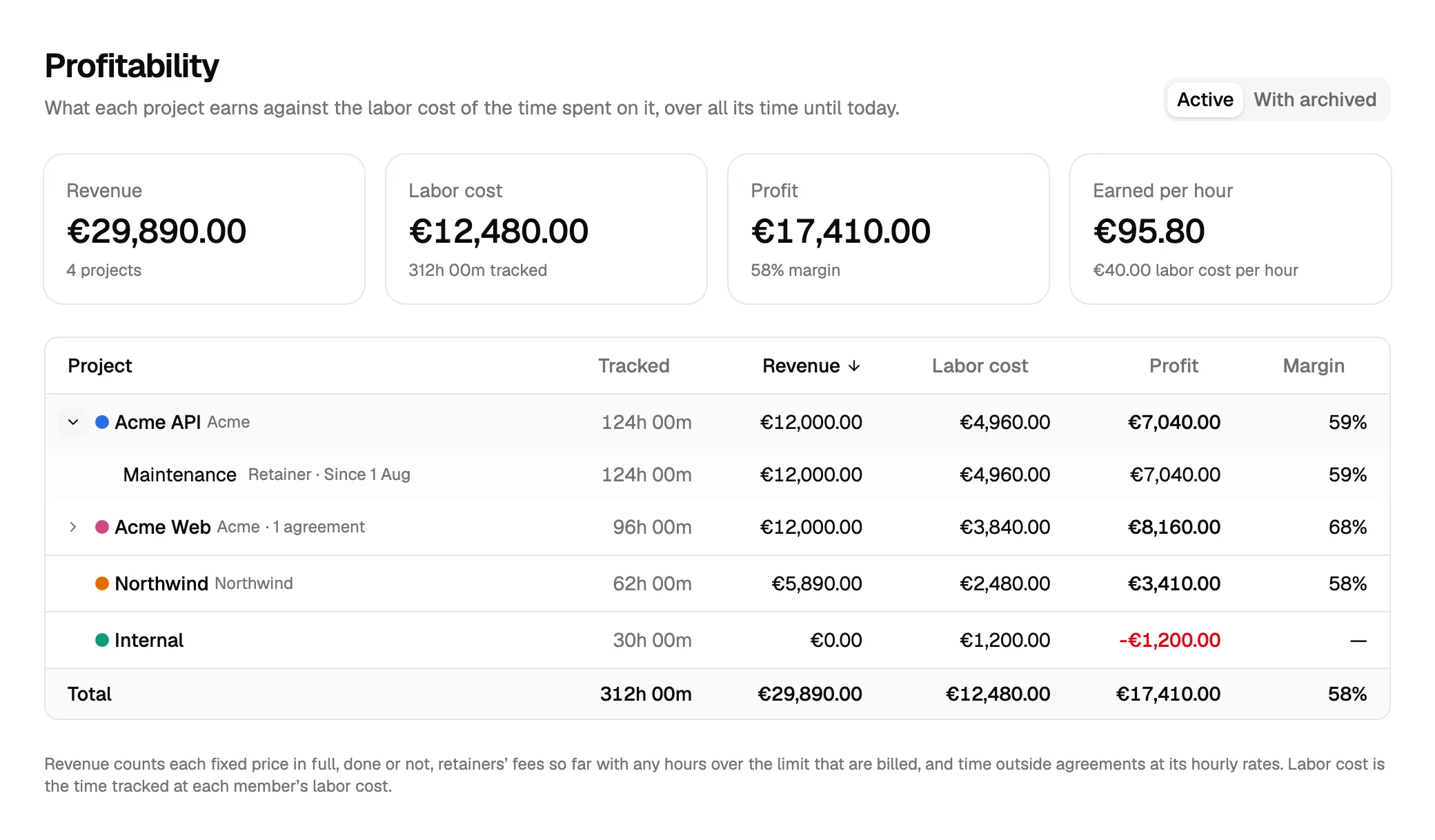
In this example everyone’s labor cost is €40 an hour. Acme Web is a fixed price, Acme API a retainer, Northwind is billed by the hour at €95, and Internal isn’t billed at all. Each project shows its hours, revenue, labor cost, profit and margin; the cards above add them up, with what an hour earned on average.
Billable rates
A billable rate is what an hour of billable time is worth to the client. It can be set in four places, and the most specific one wins:
| Where | Set it in | Applies to |
|---|---|---|
| A person on a project | The project’s members, Set rate on this project… | That person’s time on that project |
| A project | The project, Hourly rate | Everyone’s time on the project |
| A person | Team, Edit rates…, Billable rate | That person’s time on projects without a rate |
| The workspace | Settings, Default hourly rate | Everything else |
The currency is set once for the workspace, in Settings.
Whether time is billable is set per entry. A project marked Billable makes new time on it billable by default.
Changing a rate
When you change a rate, choose the day it applies from. Time before that day keeps the earlier rate, so last month’s reports don’t change when you raise your prices. Each rate keeps its history of changes, and removing a change lets the one before it apply again.
Labor cost
Labor cost is what an hour of a person’s time costs you, such as their salary per hour. Set it under Team, Edit rates…, Labor cost. It has a history of changes like a rate.
Profit is what the client pays less the labor cost of the time spent on the project. A project nobody pays for, such as Internal, shows only its cost.
Fixed prices and retainers
Where a client doesn’t pay by the hour, add an agreement to the project. Open the project, and under Agreements click Add agreement.
Fixed price
A price for a piece of work, such as a website build.
- Price: what the client pays for the whole of it.
- Hours quoted: optional. With it, Spindle shows how many of the quoted hours are used, such as 96 of 120.
- Starts on and Done on: leave Done on empty while the work goes on. Mark done today closes it, and Reopen opens it again.
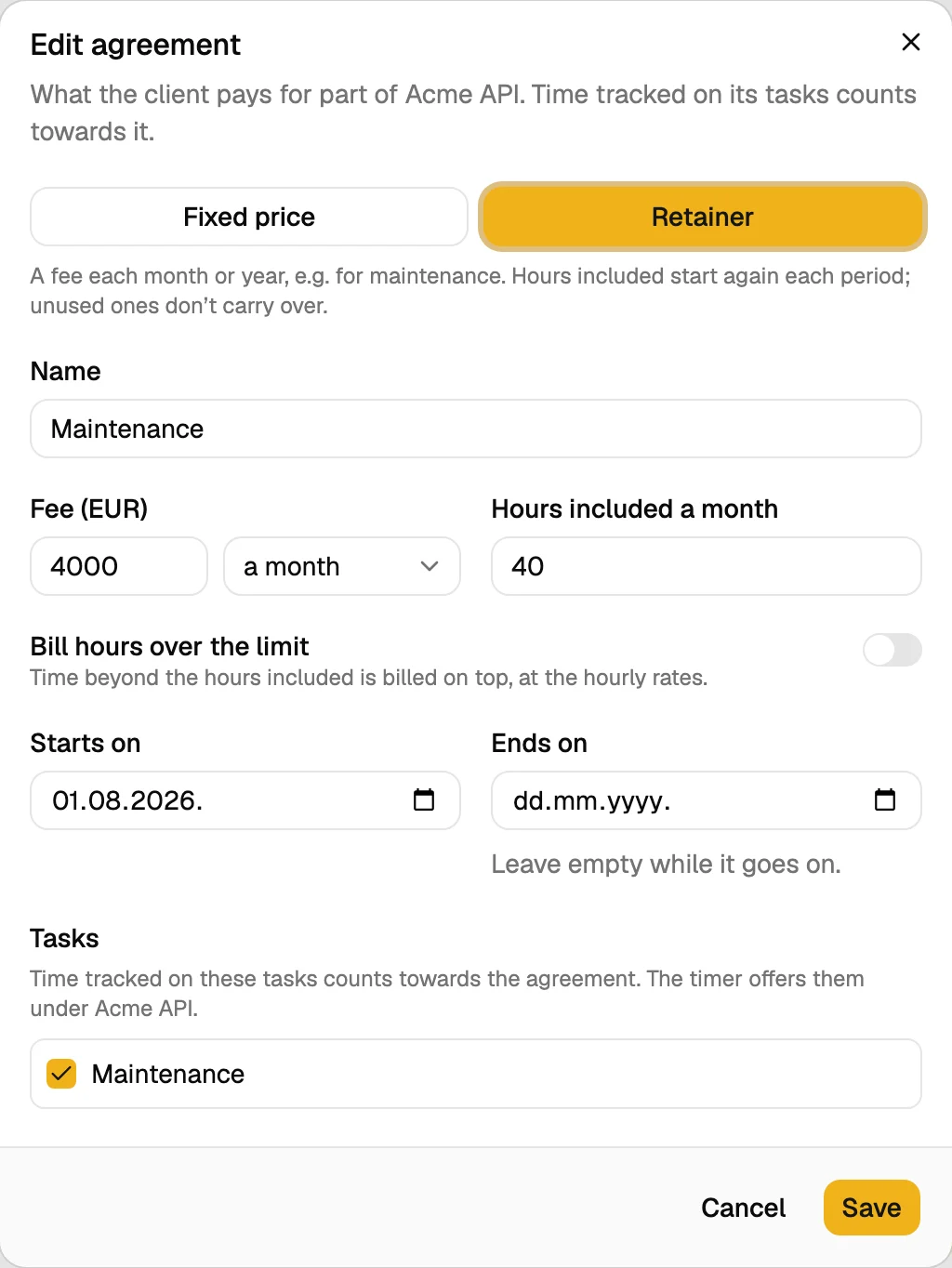
Retainer
A fee each month or year, such as for maintenance.
- Fee and whether it’s monthly or yearly.
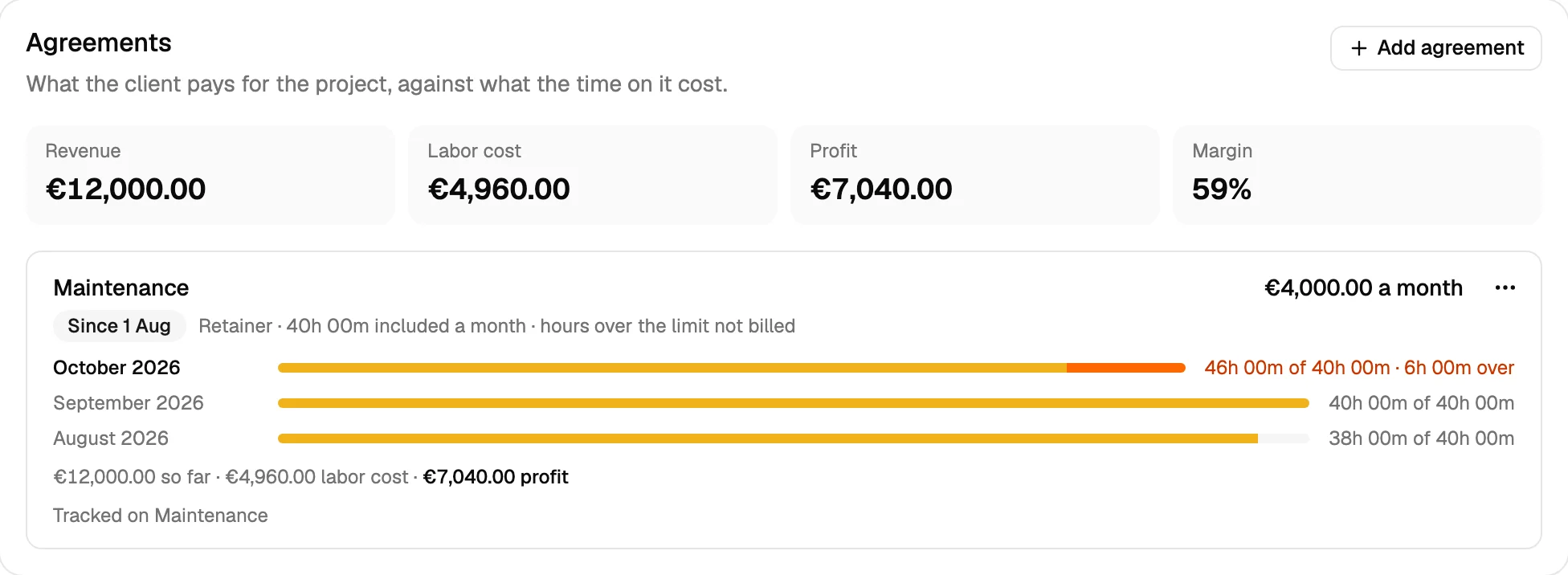
- Hours included: optional. With them, Spindle shows the hours used in each period, such as 46 of 40 in October.
- Bill hours over the limit: time beyond the hours included is billed on top, at the hourly rates.
- Starts on and Ends on: periods count from the day it starts. Leave Ends on empty while it goes on.
A retainer needs a fee, the hours included, or both. Without a fee, the included hours are paid at the project’s hourly rate. Hours included start again each period, and unused ones don’t carry over.
On the project, each agreement shows what it brought in, what its time cost, and how many hours each period used:
Which time counts towards an agreement
Time counts towards an agreement when it’s tracked on one of the agreement’s tasks. When you add an agreement, choose its tasks, or let Spindle create a task with the agreement’s name. Time on the project’s other tasks, or on no task, is billed by the hour, and shows as Outside agreements.
Time tracked before the agreement had a task can be moved onto it: Move earlier time here… takes the time without a task on the days you choose and puts it on the agreement’s task.
A split entry counts part by part: each part counts towards the agreement of its own task, at its own project’s rates.
When the client is billed something else
Sometimes what the client is billed isn’t what was tracked, such as a call nobody tracked, or a client who pays by the day. Choose it per project, under Billed time:
| Billed time | What the client is billed |
|---|---|
| As tracked | The billable time tracked |
| Entered day by day | What you enter for each person and day under Billing on the project. Days left empty are billed as tracked. |
| Full working day | A full day for every working day with time on the project, as long as you set in Hours in a full day. Weekends are billed as tracked. |
What you enter changes the billed time and the amount in reports. The tracked time and the labor cost stay as they were. Timesheet links show the client the billed time too, and a day entered by hand can say what was done.
Profitability
Profitability lists each project with its hours, revenue, labor cost, profit and margin, over all its time until today, and adds them up at the top, with what an hour earned on average. Open a project’s row to see its agreements, and the time outside them, billed by the hour. Archived projects are shown with With archived.
Revenue counts each fixed price in full, done or not, a retainer’s fees so far, with any hours over the limit that are billed, and time outside agreements at its hourly rates.
Why splits matter for money
When one entry went to several projects but counts on only one, the hours, and with them the costs, land on the wrong project. Say 15 hours of Acme Web had been tracked on Acme API: the totals would stay the same, but Acme Web, a fixed price of €12,000, would seem to have taken 81 hours instead of 96, and to earn €148 an hour instead of €125. Splitting the entry keeps each project’s hours where the work went. See How suggestions are made.
Invoices
Spindle doesn’t send invoices. It shows what there is to bill, and exports reports as PDF, CSV or Excel for your invoicing tool.